How to set the moon phase on the Snoopy MoonSwatch
To set the moon phase on the Snoopy MoonSwatch (the Mission to the Moonphase), pull the crown out to position III and use the lower pusher B: hold it to move the disc in big jumps, then tap it to finish, one hour per tap. Push the crown back to I once the moon matches tonight's.
Which MoonSwatch is the Snoopy one?
Two 2024 models carry Snoopy: the all-white Mission to the Moonphase Full Moon (SO33W700) and the all-black New Moon (SO33B700). On both, Snoopy lies asleep on the moon phase disc in the sub-dial at 2 o'clock. Swatch describes the New Moon's moon indicator as black, behind a black semi-transparent mask, so it is harder to read in dim light than the white version.
The Pink and Super Blue Moonphase editions set their moon the same way, but Swatch's pages for them don't mention Snoopy. Omega's own Silver Snoopy Speedmasters are mechanical watches with no moon phase at all.
How to set the moon phase, step by step
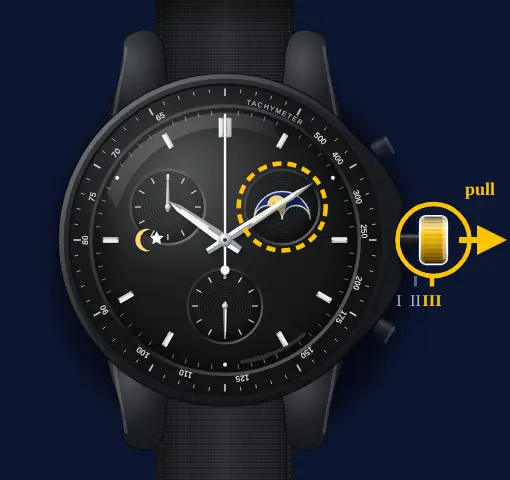
- Pull the crown out to III
Two clicks out. The small seconds hand stops, and the lower pusher B now drives the moon disc.
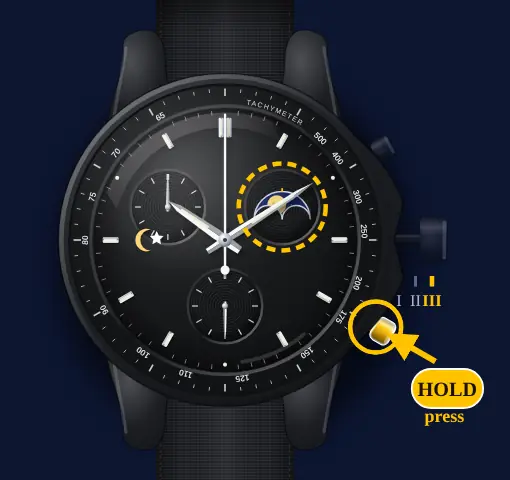
- Hold B for big jumps
Swatch's manual says a long press (over a second) keeps the disc moving forward in five-day increments, slowly at first and then faster. Let go a little before tonight's moon.
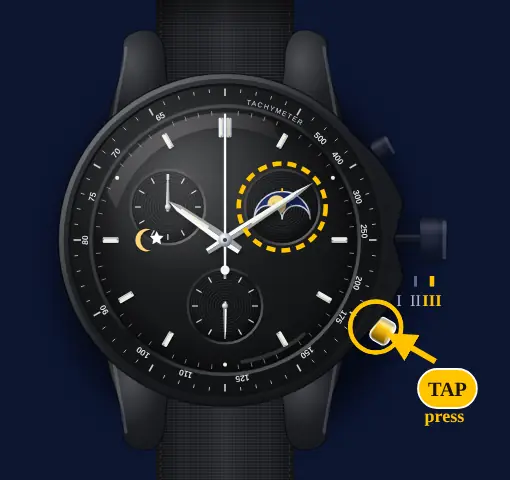
- Tap B to finish
Each short press (under a second) moves the disc forward one hour. Tap until the moon matches tonight.
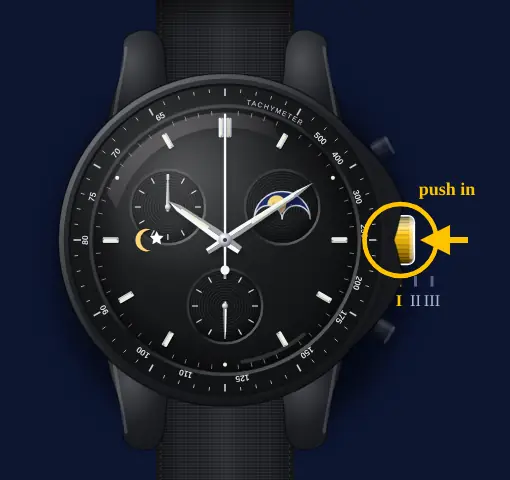
- Push the crown back to I
The hands stood still while the crown was out, so check the time and set it at III if needed.
Swatch's manual only describes the disc moving forward. If you go past tonight's moon, keep going: a full cycle is about 29.5 days of disc travel, so a long press gets you round again quickly.
How to read the Snoopy moon
The disc moves in small steps rather than one jump a day, so you set it by eye against tonight's moon. Our moon phase today page shows what that is. A hands-on review of the New Moon describes a scale of days around the edge of the sub-dial, with the top of the moon pointing to the number of days since the last full moon.
The same review found a hidden extra under ultraviolet light: the moon and stars glow blue and a message appears that you can't see in daylight, "I can't sleep without a night light."
Resetting the chronograph is different too
These models have no 1/10-second counter, so the planet-MoonSwatch routine doesn't apply. Pull the crown to II, press A to pick a hand (the chrono seconds hand makes a full turn to show it is selected), then use B to move it to 12. The full chronograph reset for every MoonSwatch has the details.
The complete Moonphase guide, including the time and both chrono hands, is on the Mission to the Moonphase page.
Sources
- Swatch — Mission to the Moonphase user manual (manufacturer PDF)
- Swatch — Mission to the Moonphase (Full Moon SO33W700 / New Moon)
- Swatch — Mission to the Moonphase Full Moon SO33W700 product page
- Swatch — Mission to the Moonphase New Moon SO33B700 product page
- Straphabit — Mission to the Moonphase review (setting)